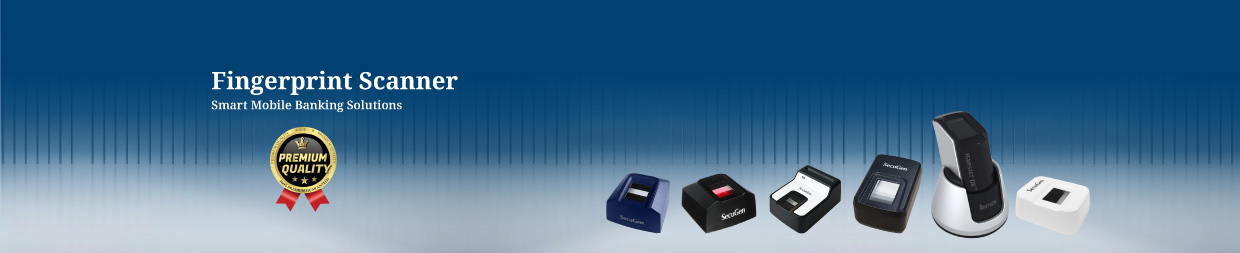
USB Fingerprint Reader Price in BD
A USB fingerprint reader is one of the most trusted biometric devices for identity verification in Bangladesh. It is widely used for office attendance, secure entry systems, visitor management, and USB-based biometric verification. Estimated USB Fingerprint Reader Price in Bangladesh starts from ৳10,000 to ৳30,000+ depending on brand, sensor quality, compatibility, SDK support, and warranty. For organizations, choosing the right biometric fingerprint scanner can reduce time fraud, improve security, and make authentication faster and more reliable.
Key Factors That Affect USB Fingerprint Reader Price
1) Sensor Type: Optical vs Capacitive
-
Optical sensors are common and budget-friendly, good for general use.
-
Capacitive sensors often offer better image detail and can be more premium.
2) DPI / Image Quality
Higher DPI (dots per inch) usually means:
3) Matching Speed & Accuracy
Better scanners deliver:
4) SDK & Software Support
This is one of the biggest price drivers in Bangladesh.
-
Does the device include an official SDK?
-
Does it support Windows/Linux/Android?
-
Is there developer documentation?
-
Does it support 32-bit/64-bit systems?
5) OS Compatibility
Common requirements:
6) Security Certifications
Some projects require compliance or standards such as:
-
Stable encryption of templates
-
Device-level security features
-
Reliable API support
These features typically increase price.
7) Build Quality & Durability
Commercial-grade devices perform better under:
8) Warranty & After-Sales Support
In Bangladesh, buyers strongly prefer devices with:
USB Fingerprint Reader Price Range in BD 2026
| USB Fingerprint Reader |
Estimated Price in (BDT) |
| SecuGen Hamster Pro 20 Fingerprint Scanner |
৳6,500 - ৳10,500 |
| SecuGen Hamster Pro 30 Fingerprint SIM Registration Scanner |
৳7,500 - ৳15,000 |
| SecuGen Hamster Pro Duo SC-PIV Fingerprint Reader |
৳10,000 - ৳20,000 |
| SecuGen Hamster Pro HUPx Fingerprint Scanner |
৳6,000 - ৳8,000 |
| Nitgen Fingkey Hamster II DX USB Fingerprint Scanner |
৳7,500 - ৳10,500 |
| Nitgen Fingkey Hamster III Fingerprint Scanner |
৳8,500 - ৳12,500 |
| Futronic FS80 Biometric Fingerprint SIM Registration Scanner |
৳8,500 - ৳12,500 |
| Futronic FS82 USB Agent Banking Biometric Fingerprint Reader |
৳9,500 - ৳15,500 |
| AbeTree HUPx USB Biometric Fingerprint Scanner |
৳6,000 - ৳8,500 |
| AbeTree Hamster Pro 20 USB Fingerprint Scanner |
৳6,500 - ৳9,500 |
Note: Prices may change based on import cost, availability, model revision, and warranty policy. For corporate procurement, always request a written quotation including warranty and after-sales support.
What is a USB Fingerprint Reader?
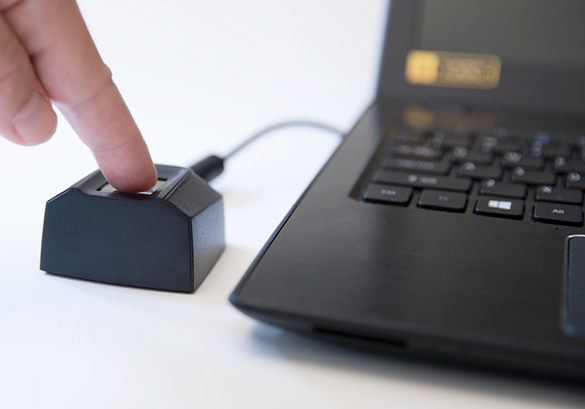
A USB Fingerprint Reader is a biometric input device that captures a fingerprint image and converts it into a digital template for identity verification. It connects to a computer or compatible device using a USB port and works with software that performs fingerprint enrollment (registration) and matching (verification).
How Does a Fingerprint Reader Work?
-
Image Capture: The scanner captures a high-resolution image of the fingerprint.
-
Processing: The device extracts unique features like ridges and valleys.
-
Comparison: The scanned fingerprint is compared with stored data.
A USB fingerprint reader does not automatically “unlock a door” by itself like a full access control terminal. Instead, it’s typically used for software-based authentication and can be part of a bigger access control or attendance solution.
USB Fingerprint Reader vs Fingerprint Access Control Terminal
Many buyers confuse these two products. Here’s the difference:
USB Fingerprint Reader (PC-Based)
-
Connects via USB to a PC/laptop
-
Works through software or SDK
-
Used for login/authentication/attendance on a computer
-
Best for software systems, offices, integration projects
Fingerprint Access Control Terminal (Door-Based)
-
Mounted on wall near door
-
Controls EM lock/strike lock
-
Often includes RFID, PIN, relay output
-
Best for door security and entry control
If your goal is door access, choose an access control terminal.
If your goal is software authentication or desktop attendance, choose a USB fingerprint reader.
Why Fingerprint Scanners are Popular
Bangladesh organizations are adopting biometric solutions quickly due to better security needs and the demand for accurate attendance tracking. A reliable fingerprint sensor helps organizations reduce unauthorized access and improve workforce management.
- Fast identity verification for offices, factories, and institutions
- Reduces proxy attendance and manual entry errors
- Works well with HRM, attendance software, and access control systems
- Improves security in restricted rooms, labs, and data-sensitive areas
Key Features That Affect USB Fingerprint Scanner Price
If two devices look similar but their prices are different, the difference usually comes from these specifications:
1) Fingerprint Sensor Quality
High-quality sensors capture clearer fingerprint images and work better with dry/wet fingers. Better sensors also reduce failure rates and increase matching accuracy.
2) SDK and Software Compatibility
For USB devices, SDK availability is critical. Many organizations need integration with attendance software, ERP, visitor management, or custom applications. Devices with stable SDK support typically cost more.
3) Speed and Accuracy
Professional biometric fingerprint scanners offer faster capture, higher template quality, and more consistent matching. This is important for high-traffic environments.
4) Build Quality and Durability
Industrial-grade models are made for daily heavy use. Better body material, stable electronics, and strong sensor protection increase lifespan and price.
5) Warranty and After-Sales Support
In Bangladesh, official warranty and service support are extremely important. A slightly higher price with reliable after-sales service is often the smarter long-term decision.
Types of Fingerprint Scanners
USB Fingerprint Scanner
A USB fingerprint scanner is used with a computer system. It is common for enrollment, identity verification, and software-based biometric systems. This is often called a usb finger scanner or USB fingerprint reader.
Optical Fingerprint Scanner
Optical scanners are popular due to stable performance and cost efficiency. They capture fingerprint images using light-based scanning.
Capacitive Fingerprint Sensor
Capacitive sensors are common in modern biometric devices. They can provide fast and accurate capture and are resistant to certain surface noise.
Biometric Fingerprint Scanner for Access Control
For door security, fingerprint devices are used as part of finger print access control systems. These can support fingerprint + card + PIN verification for stronger security.
Common Uses of USB Fingerprint Reader
1) Office PC & Laptop Login Security
Many organizations want to stop password sharing or weak passwords. USB fingerprint readers can enable biometric login, especially for:
2) Attendance & Workforce Management Software
USB fingerprint scanners are often used with desktop attendance software to:
3) POS & Retail User Authentication
In busy retail shops, different cashiers use the same POS machine. USB fingerprint login ensures:
-
Correct cashier identification
-
Secure sales authorization
-
Reduced fraud in refunds/discount approvals
4) Visitor Registration & ID Verification
Visitor management systems may use USB fingerprint readers for:
5) Government / Healthcare / Education Projects
Biometric verification is used in many identity-based processes:
6) Software Integration Projects (SDK-Based)
For developers and system integrators, USB fingerprint readers become a critical hardware component in:
-
Web-based biometric login
-
HRM/ERP systems
-
Access permission systems
-
KYC and identity verification apps
Biometric SIM Registration Fingerprint Scanner
Biometric SIM Registration Scanner is made mandatory for all the existing and new SIM card holders in Bangladesh in 2015. Consequently, every mobile operator in Bangladesh had to develop a ‘Biometric SIM Registration’ system for re-registration of existing users as well as new SIM registration.
GCTL is the pioneer in this Biometric SIM Registration project. GCTL has provided it’s Biometric SIM Registration system to Airtel, Robi, GrameenPhone, Banglalink, and Teletalk.A mobile app that collects subscriber information, with usb fingerprint Scanner. A middleware which interconnects mobile/web apps with the ECB NID database and mobile operators internal systems.
Additionally, GCTL also offers fingerprint scanner, and fingerprint Reader through our partner Abetree, Secugen, Futronics Other Many brands of USB fingerprint Scanner.
Agent Banking fingerprint Scanner
Agent Banking Fingerprint Scanner helps with smooth remote Banking activities. An agent bank is a bank that performs services in some capacity on behalf of an entity with fingerprint Scanning Device . An agent bank, also known as agency bank, can offer a wide variety of services for businesses looking to expand internationally. These banks generally act on behalf of another bank or group of banks, but they can act on behalf of a person or business.
Best Suggested USB fingerprint scanners in Bangladesh
The Futronic FS80H USB 2.0 is a high-quality optical fingerprint scanner whose rugged case and tough crown glass window make it ideal for environments with heavy or unattended usage.
The Futronic FS82HC is an enhanced version of FS80H USB2.0 Fingerprint Scanner. It was certified by FBI to be compliant with PIV-071006 Image Quality Specification (view PDF) for Singer Finger Reader. So FS82 meets the US Federal Information Processing Standard 201(FIPS)
The SecuGen Hamster Pro HUPx is SecuGen's new ultra-compact, high image quality USB fingerprint reader. Featuring a low-profile design, the Hamster Pro is built with the industry's most rugged and advanced optical sensor using patented fingerprint technology.
The SecuGen Hamster Pro 20 is a new ultra-compact, high image quality USB fingerprint reader that is FBI Certified and meets FIPS 201 (PIV) and FAP 20 Mobile ID requirements.
How to Choose the Right USB Fingerprint Reader
Step 1: Confirm Your Purpose
Choose based on your primary need:
Step 2: Check Software Compatibility
This is critical. Ask:
-
Does the device work with your software?
-
Do you need an SDK for integration?
-
Does it support your OS and architecture (64-bit)?
Step 3: Decide User Volume
If many employees scan daily, you need:
-
better sensor quality
-
faster capture speed
-
stronger durability
Step 4: Consider Finger Conditions
In Bangladesh, finger dryness, sweat, or dust can affect scanning. Choose devices known for:
Step 5: Prefer Official Support & Warranty
A stable device with real support is better than a cheap unit with driver problems.
Installation & Setup Tips
USB fingerprint readers are simple, but proper setup prevents most issues.
Best practices:
-
Use the original driver/software from the supplier
-
Avoid using damaged USB ports or loose front-panel ports
-
Plug directly into the PC (avoid low-quality USB hubs)
-
Keep the scanner surface clean
-
Enroll fingerprints properly:
Common issues and solutions:
-
Device not detected → reinstall driver, change USB port
-
Fingerprint mismatch → re-enroll properly, clean sensor
-
Slow verification → update software/SDK, check system resources
-
Frequent rejection → choose higher quality sensor or improve enrollment process
Why Buy from GCTL in Bangladesh?
When you buy from an experienced supplier, you receive more than just hardware. A professional supplier should provide genuine products, compatibility guidance, warranty service, and documentation support for corporate procurement. GCTL supports organizations with model selection based on usage type, software needs, and service expectations. They provides SecuGen fingerprint scanner, Futronic fingerprint scanner, Nitgen fingerprint scanner and AbeTree fingerprint scanner.
Final Thought
A USB Fingerprint Reader is one of the most practical biometric devices for Bangladesh because it delivers strong authentication at an affordable cost and integrates easily into software-based systems. Whether you need biometric login, attendance verification, POS authentication, or a complete SDK-based integration project, choosing the right USB fingerprint scanner depends on the real factors that matter: sensor quality, OS compatibility, SDK support, capture accuracy, durability, and warranty.
Fingerprint Scanner FAQs
2) Can I use a USB fingerprint reader for attendance?
Yes. Many organizations use USB fingerprint scanners with PC-based attendance software for employee verification and reporting.
3) Does a USB fingerprint reader work without the internet?
Yes. Most USB fingerprint readers work offline. The Internet is only needed if your software is cloud-based.
4) Is SDK necessary for USB fingerprint scanners?
If you want to integrate the scanner into your own software/app, SDK is important. For plug-and-play software, SDK may not be required.
5) Which is better: optical or capacitive USB fingerprint scanner?
Both can work well. Capacitive sensors often provide better detail and premium performance, while optical sensors are common and cost-effective.
6) Can a USB fingerprint reader unlock a door directly?
Not directly. A USB fingerprint reader is mainly for software authentication. For door locking, use an access control terminal or controller-based system.
7) What OS supports USB fingerprint readers?
Many models support Windows 10/11. Some also support Linux or Android—compatibility depends on drivers and SDK support.