


Interactive Whiteboard Features, Uses and Buying Guide
An Interactive Whiteboard helps teachers and presenters combine traditional writing with digital content. When connected to a computer and compatible projector, it allows users to open lessons, control applications, write over documents, draw diagrams, highlight important information and save annotated materials directly from the board.
Interactive Whiteboards are commonly installed in schools, colleges, universities, coaching centres, training rooms and corporate presentation spaces. They are especially suitable for organisations that already have projectors and computers but want to introduce touch-based teaching and collaborative presentation features.
Choosing the correct board requires more than selecting a screen size. Buyers should evaluate touch accuracy, projector compatibility, software features, calibration, installation requirements, warranty and after-sales support.
What Is an Interactive Whiteboard?
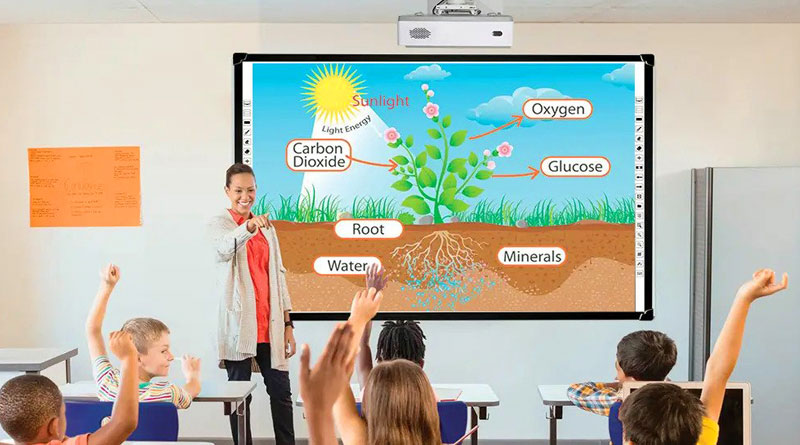
An Interactive Whiteboard is a large touch-sensitive board that works with a computer and projector. The computer runs the lesson, presentation or whiteboard software, while the projector displays the image on the board surface.
The board detects finger or stylus input and sends the command back to the computer. This allows the teacher or presenter to control digital content directly from the board.
Users can:
- Open files and applications
- Write over PDF documents and presentations
- Draw diagrams and shapes
- Highlight text and images
- Move digital objects
- Play educational videos
- Save annotated lesson pages
- Export completed notes for future use
Unlike an all-in-one display, a traditional Interactive Whiteboard does not produce an image by itself. It normally requires a projector, computer, cabling and compatible software.
How an Interactive Whiteboard Works
A complete Interactive Whiteboard system usually includes three main components.
Interactive Whiteboard
The board provides the touch-sensitive writing area. It detects finger or stylus movement and communicates the selected position to the computer.
Computer
The computer runs the operating system, whiteboard software, presentations, educational applications and lesson files.
Projector
The projector displays the computer image across the active area of the board.
A USB connection usually carries touch commands from the board to the computer, while HDMI, VGA or another supported display connection carries the image to the projector.
When a user touches an icon, document or writing tool on the board, the system performs the same action on the connected computer.
Main Features of an Interactive Whiteboard
Finger and Stylus Writing
Many infrared Interactive Whiteboards support writing with a finger or passive stylus. This makes classroom operation simple because battery-powered pens may not be required for normal use.
Multi-Touch Support
Multi-touch allows more than one user to interact with the board simultaneously. This is useful for group activities, student participation and collaborative training exercises.
The number of touch points is important, but it should not be the only buying factor. Writing accuracy, response time and calibration stability usually have a greater impact on the user experience.
Digital Annotation
Teachers can write over presentations, websites, documents, images and supported applications. The annotation can help explain difficult topics, mark important information and guide classroom discussions.
Lesson Saving
Compatible whiteboard software may allow users to save annotated pages, export them in supported formats or reuse them in future lessons.
Computer Control
The board works like a large touch interface. Users can open applications, select menu items, move objects, play media and control presentation slides without returning to the computer.
Educational Software
Whiteboard software may include:
- Digital pens and highlighters
- Shapes and lines
- Text tools
- Erasers
- Screen annotation
- Image and document import
- Page management
- Undo and redo tools
- Lesson-saving features
- File export options
Software features vary by brand and model, so buyers should verify the included licence and operating-system compatibility.
Where Interactive Whiteboards Are Used
Schools
Teachers can present digital lessons, explain diagrams, annotate textbooks and involve students in interactive learning activities.
Colleges and Universities
Lecturers can display technical content, demonstrate software, review research materials and save annotated lecture notes.
Coaching Centres
Instructors can prepare reusable lessons, explain examination questions and combine handwritten explanations with online resources.
Training Rooms
Trainers can annotate presentations, demonstrate workflows and involve participants in practical activities.
Corporate Offices
Teams can use an Interactive Board for presentations, project planning, report reviews and collaborative discussions.
Government and Institutional Projects
Interactive Whiteboards can support digital training, education programmes and presentation requirements in government and institutional environments.
Interactive Whiteboard vs Normal Whiteboard
A normal whiteboard provides a physical writing surface for dry-erase markers. An Interactive Whiteboard adds touch control, multimedia presentation and digital lesson-saving capabilities.
Normal Whiteboard
- Uses dry-erase markers
- Cannot display digital content
- Notes must be copied or photographed
- Does not control a computer
- Requires minimal setup
Interactive Whiteboard
- Supports finger or stylus input
- Displays computer content through a projector
- Allows digital annotation
- Can save lesson notes
- Supports videos, images and educational applications
- Requires a computer, projector and software
A normal whiteboard may be sufficient for basic writing. An Interactive Whiteboard is more suitable when teachers need digital content, multimedia and reusable lesson materials.
Interactive Whiteboard vs Interactive Flat Panel
Interactive Whiteboards and Interactive Flat Panels both support touch writing, but their display systems are different.
Interactive Whiteboard
- Requires an external projector
- Usually requires an external computer
- Image quality depends on the projector
- Presenter shadows may occur
- Projector alignment and calibration are important
- Generally has a lower initial cost
- Suitable for rooms with an existing projector
Interactive Flat Panel
- Includes a built-in display
- Usually includes Android
- May support an optional Windows OPS computer
- Does not create projector shadows
- Does not require projector lamp replacement
- Provides better visibility in normal lighting
- Generally has a higher initial cost
An Interactive Whiteboard can be a cost-effective option when an institution already owns a suitable projector and computer. An Interactive Flat Panel may be more practical for organisations that require an all-in-one touchscreen display.

What Is an Interactive Whiteboard?
An Interactive Whiteboard is a large touch-sensitive board that works with a computer and projector. The computer runs the lesson, presentation or whiteboard software, while the projector displays the image on the board surface.
The board detects finger or stylus input and sends the command back to the computer. This allows the teacher or presenter to control digital content directly from the board.
Users can:
- Open files and applications
- Write over PDF documents and presentations
- Draw diagrams and shapes
- Highlight text and images
- Move digital objects
- Play educational videos
- Save annotated lesson pages
- Export completed notes for future use
Unlike an all-in-one display, a traditional Interactive Whiteboard does not produce an image by itself. It normally requires a projector, computer, cabling and compatible software.
How an Interactive Whiteboard Works
A complete Interactive Whiteboard system usually includes three main components.
Interactive Whiteboard
The board provides the touch-sensitive writing area. It detects finger or stylus movement and communicates the selected position to the computer.
Computer
The computer runs the operating system, whiteboard software, presentations, educational applications and lesson files.
Projector
The projector displays the computer image across the active area of the board.
A USB connection usually carries touch commands from the board to the computer, while HDMI, VGA or another supported display connection carries the image to the projector.
When a user touches an icon, document or writing tool on the board, the system performs the same action on the connected computer.
Main Features of an Interactive Whiteboard
Finger and Stylus Writing
Many infrared Interactive Whiteboards support writing with a finger or passive stylus. This makes classroom operation simple because battery-powered pens may not be required for normal use.
Multi-Touch Support
Multi-touch allows more than one user to interact with the board simultaneously. This is useful for group activities, student participation and collaborative training exercises.
The number of touch points is important, but it should not be the only buying factor. Writing accuracy, response time and calibration stability usually have a greater impact on the user experience.
Digital Annotation
Teachers can write over presentations, websites, documents, images and supported applications. The annotation can help explain difficult topics, mark important information and guide classroom discussions.
Lesson Saving
Compatible whiteboard software may allow users to save annotated pages, export them in supported formats or reuse them in future lessons.
Computer Control
The board works like a large touch interface. Users can open applications, select menu items, move objects, play media and control presentation slides without returning to the computer.
Educational Software
Whiteboard software may include:
- Digital pens and highlighters
- Shapes and lines
- Text tools
- Erasers
- Screen annotation
- Image and document import
- Page management
- Undo and redo tools
- Lesson-saving features
- File export options
Software features vary by brand and model, so buyers should verify the included licence and operating-system compatibility.
Where Interactive Whiteboards Are Used
Schools
Teachers can present digital lessons, explain diagrams, annotate textbooks and involve students in interactive learning activities.
Colleges and Universities
Lecturers can display technical content, demonstrate software, review research materials and save annotated lecture notes.
Coaching Centres
Instructors can prepare reusable lessons, explain examination questions and combine handwritten explanations with online resources.
Training Rooms
Trainers can annotate presentations, demonstrate workflows and involve participants in practical activities.
Corporate Offices
Teams can use an Interactive Board for presentations, project planning, report reviews and collaborative discussions.
Government and Institutional Projects
Interactive Whiteboards can support digital training, education programmes and presentation requirements in government and institutional environments.
Interactive Whiteboard vs Normal Whiteboard
A normal whiteboard provides a physical writing surface for dry-erase markers. An Interactive Whiteboard adds touch control, multimedia presentation and digital lesson-saving capabilities.
Normal Whiteboard
- Uses dry-erase markers
- Cannot display digital content
- Notes must be copied or photographed
- Does not control a computer
- Requires minimal setup
Interactive Whiteboard
- Supports finger or stylus input
- Displays computer content through a projector
- Allows digital annotation
- Can save lesson notes
- Supports videos, images and educational applications
- Requires a computer, projector and software
A normal whiteboard may be sufficient for basic writing. An Interactive Whiteboard is more suitable when teachers need digital content, multimedia and reusable lesson materials.
Interactive Whiteboard vs Interactive Flat Panel
Interactive Whiteboards and Interactive Flat Panels both support touch writing, but their display systems are different.
Interactive Whiteboard
- Requires an external projector
- Usually requires an external computer
- Image quality depends on the projector
- Presenter shadows may occur
- Projector alignment and calibration are important
- Generally has a lower initial cost
- Suitable for rooms with an existing projector
Interactive Flat Panel
- Includes a built-in display
- Usually includes Android
- May support an optional Windows OPS computer
- Does not create projector shadows
- Does not require projector lamp replacement
- Provides better visibility in normal lighting
- Generally has a higher initial cost
An Interactive Whiteboard can be a cost-effective option when an institution already owns a suitable projector and computer. An Interactive Flat Panel may be more practical for organisations that require an all-in-one touchscreen display.